Your clips.
Add supported Nikon ZR RAW video clips or folders and choose a destination for new copies.
 Raw CompactSupport ↗
Recompress your footage into lighter RAW copies.
Keep the original frame size. Make room for the next cut.
For Nikon ZR footage.
Apple silicon · macOS 14 or later.
RAW video recompression software by Brightbox Studios Inc., Canada.
Pre-release product. This website presents the software; sales and app downloads are not open. Read the release status ↓
Lossy compression. Keep your camera masters.

Add your clips. Choose a level.
Create smaller RAW copies on your Mac.
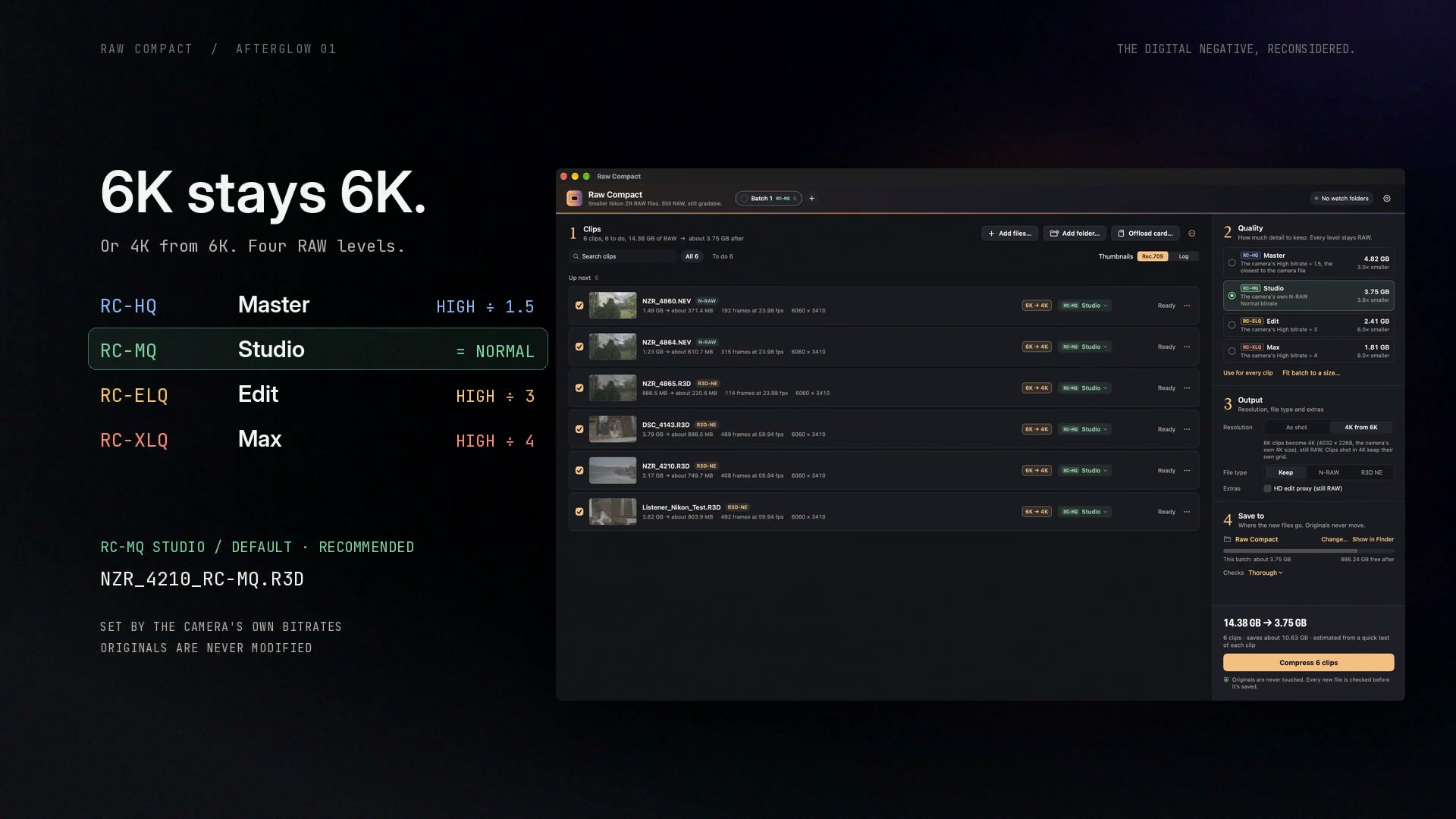
A Nikon ZR 6K/60p R3D NE example introduces smaller same-resolution RAW copies. Four RC levels follow the camera’s own bitrates: Master is the camera’s High ÷ 1.5, Studio matches the camera’s N-RAW Normal and is the recommended starting point, Edit is High ÷ 3 and Max is High ÷ 4. 6K can stay 6K, or become 4K.
The recorded NZR_4210 sample has 408 frames. Its camera original is 3.17 GB and its saved RC-XLQ Max copy is 0.82 GB: 74.0% smaller in this sample. This is one sample, not a guaranteed saving for every clip.
The equal-1-TB capacity illustration uses a nominal 3,780 Mbps source: about 35 minutes, or about 141 minutes at Max (the camera’s High ÷ 4, about 945 Mbps). Real capacity varies with your recording settings and actual output size.
Compression is lossy. Keep the camera originals and review the copies in your RAW workflow.
Add supported Nikon ZR RAW video clips or folders and choose a destination for new copies.
Choose Master, Studio, Edit or Max. Keep the original frame size, or select the camera’s 4K size for 6K footage.
Recompression runs on your Mac. Keep your camera masters and review the results in a compatible RAW reader.
RC-MQ · StudioRaw Compact writes new copies to your chosen destination. Keep the camera masters as your reference and review the copies before changing your archive.
A code suffix helps identify your chosen level, for example NZR_4210_RC-MQ.R3D. You can also keep original filenames for relinking. Existing output names receive a numbered suffix to avoid collisions.
Recompression changes image data.
Your new copy remains RAW at the original frame size, unless you choose 4K from 6K.
Raw CompactRecompress RAW image dataAll four levels are lossy. Review texture, motion and demanding grades against the original before choosing stronger compression.
Four levels, set by the ZR’s own bitrates.
Studio matches the camera’s N-RAW Normal. Choose more room when your project calls for it.
20 GB target model: about 10.00 GB out, 10.00 GB saved. RC-MQ Studio matches the camera’s own N-RAW Normal bitrate. Actual sizes vary with the scene and source format.
NZR_4210_RC-MQ.R3DThese figures illustrate 20 GB divided by each configured target. They are illustrations, not measured outputs or guaranteed savings. Compression is lossy; review your camera originals before choosing stronger settings.
20 GB recorded at the camera’s High quality.
Each level’s size, set by the ZR’s bitrates.
| RC level | Level size | Before | Target model after |
|---|---|---|---|
| RC-HQ MasterHighest quality for finishing and heavy grading | camera High ÷ 1.5 | 20.00 GB | 13.33 GB |
| RC-MQ StudioDEFAULT / RECOMMENDED | the camera’s N-RAW Normal, about 2× | 20.00 GB | 10.00 GB |
| RC-ELQ EditLighter copies for bigger edits | camera High ÷ 3 | 20.00 GB | 6.67 GB |
| RC-XLQ MaxMost space saved | camera High ÷ 4 | 20.00 GB | 5.00 GB |
Illustrations use 20 GB of footage recorded at the camera’s High quality, at the original frame size. Footage already recorded at N-RAW Normal steps down 1.5×, 2×, 3× and 4× instead. Real file sizes depend on the scene, source format and selected level. Every level is lossy; review your copies against the camera original.
Each level is set from the Nikon ZR’s published bitrates for the clip’s mode and frame rate: Master is the camera’s High bitrate ÷ 1.5, Studio is the camera’s own N-RAW Normal bitrate (about half of High), Edit is High ÷ 3 and Max is High ÷ 4. Studio illustrates 20 ÷ 2 = 10.00 GB. Example: 6K at 23.976p records about 1,520 Mbps at High; Studio comes out near 780 Mbps, the camera’s Normal. Actual output sizes vary; a target does not guarantee an exact result for every clip.
The original frame dimensions stay the same. These examples do not include resizing. The controls on this page illustrate the choices; they do not upload or process your camera files.
An illustrative 6K storage model.
At Max, the camera’s High bitrate ÷ 4, your footage takes a quarter of the room.
Nominal illustrations, not guaranteed recording times. One decimal TB at 3,780 Mbps is 35.27 minutes; applying 4× gives 141.08 minutes. Actual capacity varies with recording settings and output size.
RAW video. Native frame size.
For Apple silicon Mac.
For Nikon ZR footage.
Apple silicon · macOS 14 or later.
A compatible RAW reader is required for playback and grading. NEF and NRW still-photo files are outside this RAW video scope.
This initial offering is scoped to Nikon ZR R3D NE and N-RAW video. A shared extension does not establish support for other cameras or RAW formats.
Every level works at the frame size you shot. Shot in 6K? You can also keep a 4K RAW copy at the camera’s own 4K size (4032 × 2268) and bitrates: about 4× smaller from High footage at Studio, which matches the ZR’s 4K N-RAW Normal. HD export is not offered; an optional small HD RAW proxy can be saved in a separate Proxy folder for offline editing.
You can also convert between N-RAW and R3D NE. The new file is a real conversion, not a renamed extension, and opens like a clip recorded in that format: as on the camera, R3D NE reads about half a stop brighter than N-RAW.
No. Raw Compact creates new copies. Keep your camera masters and review the copies before deciding how to store your project.
No. All four levels are lossy. Fine texture, motion and demanding grades can reveal changes. Start with Studio, compare against your camera originals and choose the level that suits your footage.
No. The 20 GB sheet illustrates the configured targets. Real sizes vary with the scene, source format and selected level.
On your Mac. Choose the clips or folders you want to process and the destination for the new RAW copies.
Raw Compact is the RAW video recompression app. ZR RAW Extended is the separate HEVC/ProRes product.
No. Raw Compact is a pre-release product. This site shows the app, its intended workflow and recorded demonstrations. No orders, payments or app downloads are accepted here.
US$50, one-time. Your licence never expires and includes every 1.x update, on one activated Mac at a time. To move it, deactivate it online on the old Mac, then activate it on the new one. After a successful online check it works up to seven days offline; when another check is due, reconnect before starting new jobs. An export already running finishes normally. If your Mac is lost or can’t be deactivated, email rawcompact@gmail.com and we’ll reset it. Refunds are handled case by case: if Raw Compact doesn’t work on your supported Mac and we can’t fix it, you get your money back.
If you can nail white balance and exposure on set, H.265 is the smallest file your camera makes, and its log mode looks better than ever. If you shoot RAW to keep those choices open, Raw Compact lets you keep them, at up to 4× less storage. Many people will use both.

Raw Compact is in pre-release validation. The development app and product film demonstrate the workflow; a public release has not been opened.
This website does not accept orders or payments and does not distribute an app. US$50, one-time, for one Mac at a time. Release timing has not been announced.
Developed by Brightbox Studios Inc., Canada.
Product contact: rawcompact@gmail.com